Stop juggling providers.
One key runs them all.
If you're paying for two AI subscriptions, babysitting API keys, and losing work to rate limits — this is the fix. One OpenAI-compatible key unlocks PicoClaw managed OpenClaw hosting, HeyPico MCP unified MCP server, and voice-controlled automation on your Android device, with OpenAI, Gemini, GLM, DeepSeek, Qwen, Kimi and Mistral behind it. From USD 15/mo — less than one ChatGPT Plus.
Works with tool calling and streaming on every model we serve.
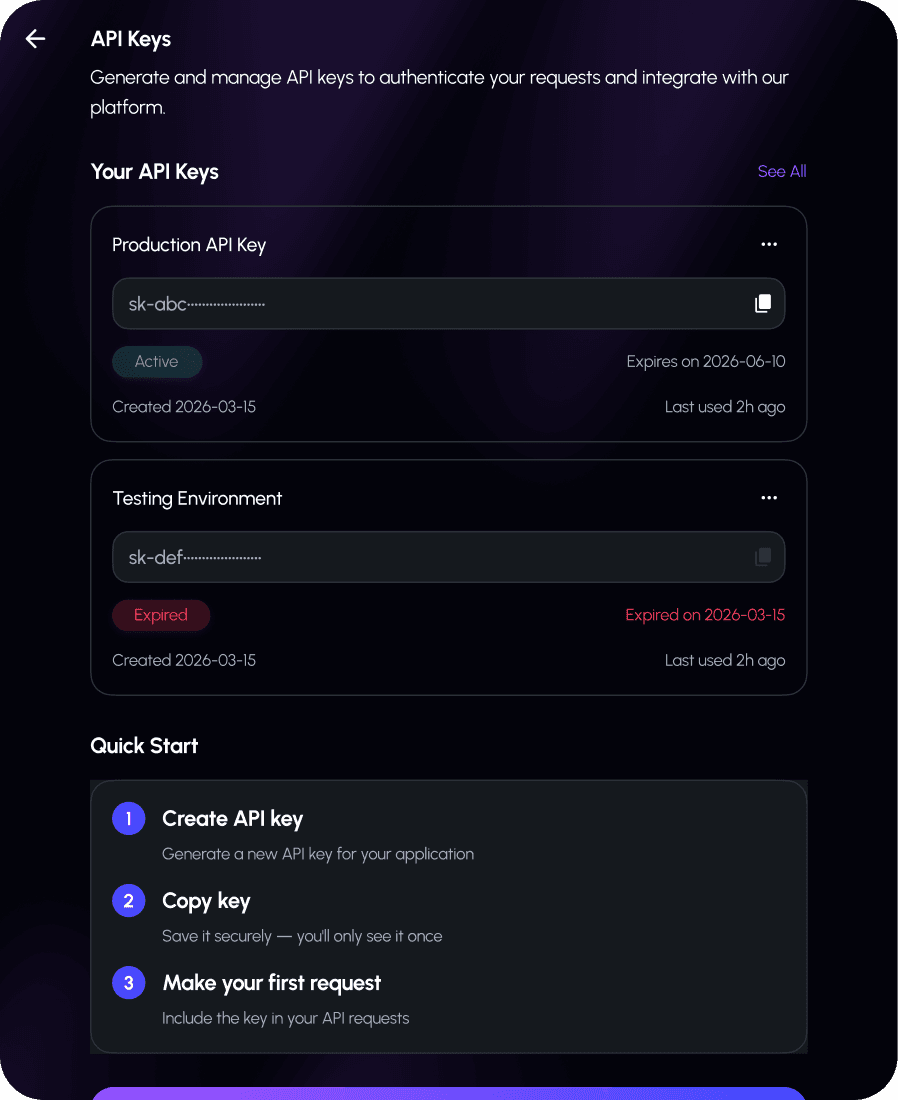
Video guide: setting up the HeyPico API
A short screen recording showing the whole flow: creating a key, pasting it into a harness, and running the first request.
Prefer to read? The written setup is above, and the full reference is in the developer docs.
Sound familiar?
This page was written from what builders say in public — Reddit threads, forums, GitHub issues. If any of this is you, keep reading.
"I pay for three AI subscriptions"
ChatGPT Plus for one thing, Claude Pro for another, Gemini for a third. The threads asking "should I stop my ChatGPT subscription and stick with Claude?" have hundreds of replies, because everyone is arbitraging $20/month against their own attention.
"Anthropic: stop shipping. Seriously."
An actual top post in r/ClaudeAI, 3,200 upvotes. Hit your limit mid-task and the work stops — one poster joked about "Claude watching me write code manually after I hit the daily limit" (4.9k upvotes). Rate limits don't care that you're mid-flow.
"Different keys. Different limits. Different outages. Different APIs."
A developer who stacked ten free tiers into one endpoint, because managing per-provider keys had become its own job. Billing in four dashboards, four rate-limit regimes, four docs to re-read every time a provider deprecates something.
"I spent 3 weeks building my dream MCP setup"
…and, in their own words on r/mcp, "honestly, most of it was useless." 697 upvotes. Wiring tools into your agent by hand is days of plumbing that stops being true the moment a provider changes something.
"If you installed OpenClaw this week, read this first"
Self-hosting your personal agent means a VPS, proxy configs, key rotation, security hardening — and staying on top of all four. The community wrote the warning post because people keep getting burned by setup they didn't know they needed.
The pattern underneath
None of these are model problems. You can already rent GPT, Gemini or GLM by the token. The cost is in everything *around* the model: the juggling, the limits, the plumbing, the hosting. That's the bill you keep paying.
Who HeyPico API is for
Meet the builder this page is written for. They run one or two open-source harnesses — OpenClaw as their personal agent, OpenCode or Codex for shipping code. They already pay for two AI subscriptions and an API account, and last month they hit a rate limit at the worst possible time. They don't want another dashboard, another vendor form, or another weekend configuring a VPS. They want the models their harnesses already point at, from one key, without the plumbing.
If that's not you — if you need raw GPU hosting, custom fine-tunes, or an enterprise DPA — the incumbent providers are still the right call. HeyPico is built for the person who just wants their agents to work.
Everything below on this page — products, setup, models, pricing — is the detail behind that table. Or skip straight to the 3-step setup.
Works with every open-source AI harness
If your tool accepts an OpenAI-compatible base URL, it works with HeyPico. That covers every major open-source harness.


How to connect HeyPico API to your AI harness in 3 steps
Create your API key
Sign in at app.heypico.ai, open Settings then API Keys, and create a key. Copy it immediately, it is shown once.
Point your harness at HeyPico
Three values, the same everywhere.
Base URL https://api.heypico.ai/v1
API key hp_live_... (your key)
Model zai.glm-5 (any id from /v1/models)

List every available model any time: curl https://api.heypico.ai/v1/models -H "Authorization: Bearer $HEYPICO_KEY"
Run it
Verify the connection before wiring it into your workflow.
curl https://api.heypico.ai/v1/chat/completions \
  -H "Authorization: Bearer $HEYPICO_KEY" \
  -H "Content-Type: application/json" \
  -d '{"model":"zai.glm-5",
        "messages":[{"role":"user","content":"Say hello"}]}'
Configuration examples for OpenClaw, OpenCode and Codex
Python, and anything using the OpenAI SDK
from openai import OpenAI

client = OpenAI(
    base_url="https://api.heypico.ai/v1",
    api_key="hp_live_...",
)

client.chat.completions.create(
    model="zai.glm-5",
    messages=[{"role": "user", "content": "Hello"}],
)
Node and TypeScript
import OpenAI from "openai";

const client = new OpenAI({
  baseURL: "https://api.heypico.ai/v1",
  apiKey: process.env.HEYPICO_API_KEY,
});
Environment variables, for harnesses that read them
export OPENAI_BASE_URL="https://api.heypico.ai/v1"
export OPENAI_API_KEY="hp_live_..."
Harnesses with a provider config file
Tools such as OpenCode define providers in a config file. Add HeyPico as an OpenAI-compatible provider with the same three values.
{
  "provider": {
    "heypico": {
      "npm": "@ai-sdk/openai-compatible",
      "options": {
        "baseURL": "https://api.heypico.ai/v1",
        "apiKey": "{env:HEYPICO_KEY}"
      },
      "models": { "zai.glm-5": {} }
    }
  }
}
AI models included: OpenAI, Gemini, GLM, DeepSeek, Qwen and more
Every model supports tool calling and streaming, so all of them work inside an agent loop. Use the exact ids returned by /v1/models. 17 models; Grok and Anthropic Claude/Opus dropped per 25 Aug meeting.
Image and video generation are not available on the public API today. Auto mode (mostly the Pico model) uses a cheaper token-deduction rate; see the pricing page.
Pricing
Billed monthly or yearly. Yearly costs less per month.
Free
Starter
Pro
Ultra
With Device
HeyPico tablet
BUNDLED WITH PLANAdd to any monthly or yearly subscription. Same tablet, cheaper with a plan.
HeyPico tablet
DEVICE ONLYBuy the tablet alone. Includes 3 months of Pro, free.
Frequently Asked Questions
Short answers. Anything not covered here belongs in the developer docs.
Is HeyPico API OpenAI-compatible and Anthropic-compatible?
Which models can I call?
What is included in my subscription?
Do the tokens I use in my harness count against my plan allowance?
Can I use one key across multiple harnesses?
What happens when I hit my token limit?
Do you offer image or video generation on the API?
How do I pay?
Is there a free tier?

Build with us
Get integration help, request models and features, and see what other people are building. We read everything and ship from it.
Get your HeyPico API key
Create a key, change one line in your harness config, keep working.