Pico is online · Ready to help

Hey, I'm Picowhat can I do for you today?

Try Now

Get it on Google PlayTry on app.heypico.aiDownload on the App Store

Try App Automation in an Emulator

From scheduling prompts to automating apps, see how HeyPico learns, navigates and automates.

Pico isn't another chatbot. It's a personal companion that sees your screen, taps your apps, and gets things done.

App Automation Emulator Showcase

Your AI Companion That Does More Than Chat

Dedicated AI Assistant
COMPANION AUTOMATION AI

A Dedicated AI Assistant, Always Within Reach

Unlike traditional AI tools that live inside a browser tab, HeyPico's Companion Device provides a dedicated environment for your AI assistant. Keep your AI companion available at all times, ready to help with automation, productivity, research, and everyday digital tasks without competing for space on your primary workspace.
COMPANION AUTOMATION AI

Automate Tasks Across Apps and Workflows

Stop wasting time on repetitive tasks. Companion Automation AI helps you automate workflows, gather information, execute routine actions, and stay organized across your digital tools. From content creation and research to project management and daily productivity, your AI companion is ready to assist whenever you need it.
Automate Tasks
HeyPico Tablet
COMPANION AUTOMATION AI

The Complete Companion Experience, Powered by the HeyPico Tablet

Unlock the full potential of Companion Automation AI with the HeyPico Tablet - a dedicated Android device designed for continuous AI assistance and workflow automation. Keep your AI running independently while managing tasks, projects, and productivity tools from a purpose-built workspace. Whether you're creating content, conducting research, managing operations, or planning your next project, HeyPico keeps intelligent assistance just a tap away.

What Is the HeyPico Companion App
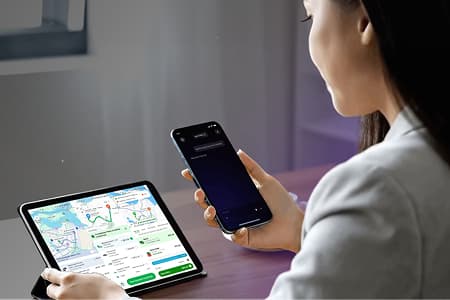
HeyPico Companion App Mockup

The HeyPico Companion App is the app that enables HeyPico to automate your Android device.

When you ask HeyPico to complete a task, the Companion App securely carries out the work by opening apps, tapping buttons, typing text, scrolling, and navigating your screen, just like you would.

Instead of simply giving you instructions, it gets the task done for you.

How to Get Started

1

Install the Companion App

Download and install the HeyPico Companion App on the Android device you want to automate.

This is the device HeyPico will interact with by opening apps, tapping buttons, typing, and completing tasks.
2

Grant Required Permissions

Open the Companion App and allow the required permissions, such as Accessibility and Screen Capture. These permissions enable HeyPico to understand what's on your screen and interact with your apps.
These permissions are only used to perform the automations you request.
3

Link Your HeyPico Account

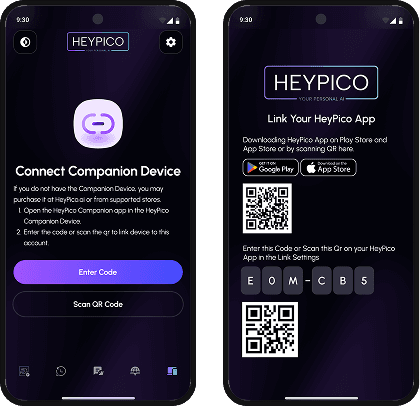
Open the HeyPico App and link it to your Companion App by scanning the QR code or entering the pairing code shown on the Companion App.

Once both apps are connected, you're ready to start automating your Android device.

Pairing Screen Mockup

Why Do I Need Two Apps?

HeyPico uses two apps because each has a specific role. The HeyPico App is where you interact with your AI assistant, while the Companion App securely carries out those instructions on your Android device. Together, they enable seamless app automation.

HeyPico App Logo

HeyPico App

Type or speak what you want HeyPico to do, such as "Book me the cheapest ride" or "Reply to my latest WhatsApp message."
Can be accessed from your browser or another Android device, so you don't need to use the same phone you're automating.
Plans and sends the task to your Android device.
HeyPico Companion App Logo

HeyPico Companion App

Receives your request and carries it out by opening apps, tapping buttons, typing text, scrolling, and navigating your screen.
Runs on the target Android device and works in the background to complete automations in real time.
Executes the task safely on your Android device and reports the result back to HeyPico.

Try Pico, or buy the tablet.

Three ways to meet your new assistant — pick one and you're talking to Pico in under a minute.

DEDICATED HARDWAREBEST EXPERIENCE

The HeyPico Tablet

Always-on, always-listening. Pre-installed, fully optimized, and built specifically to run HeyPico at its best — from home, desk, or workspace.

Buy now
from SGD 308.00
ANDROID

Google Play

The full Pico experience on your phone.

Get it on Google Play
IOS

App Store

Chat and trigger automations on iPhone.

Download on the App Store
WEB

Open Web

Access Pico from any browser tab.

Try on app.heypico.ai
COMPANION APP

Download Companion App

Run automation from your companion app

Your AI Assistant That
Remembers, Adapts, and Responds

Always-On AI Assistant

Keep your AI companion available whenever you need it through a dedicated companion device and floating workspace interface.

Intelligent Workflow Automation

Automate repetitive tasks and workflows while maintaining full control over your digital environment.

Cross-App Assistance

Receive contextual help, answers, and actions across multiple apps without constantly switching between windows.
Call to action background

Your Personalized AI Companion for Every Moment

Try Now

Get it on Google PlayTry on app.heypico.aiDownload on the App Store